Arduino mit 6x DS18B20 und NRF24L01
NRF24L01 – Board Schematic & Pin-Out
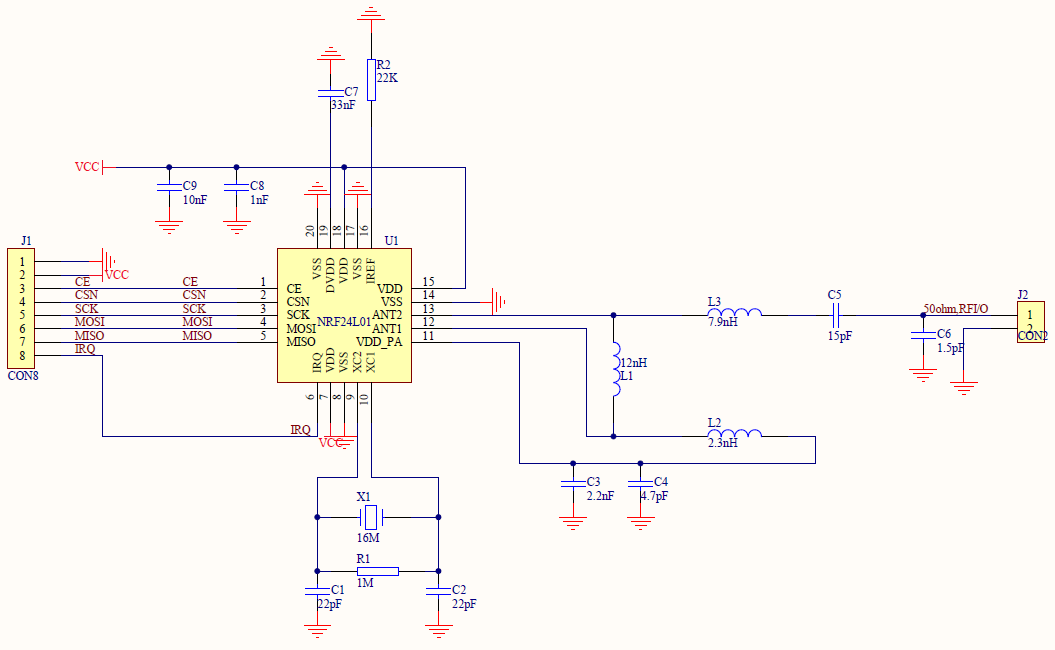
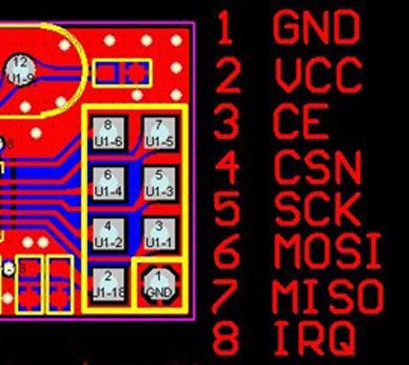
Library http://tmrh20.github.io/RF24/
nRF24L01_Product_Specification_v2_0
DS18B20
Sensor 01 (Raumtemperatur):
0x10, 0xC4, 0x1E, 0x0A, 0x03, 0x08, 0x00, 0xEF
Sensor 02:
0x28, 0xFF, 0x0C, 0x0C, 0x86, 0x16, 0x04, 0xEF
Sensor 03:
0x28, 0xFF, 0xB2, 0x89, 0x90, 0x16, 0x05, 0x9F
Sensor 04:
0x28, 0xFF, 0x46, 0xC5, 0x86, 0x16, 0x05, 0x4F
Sensor 05:
0x28, 0xFF, 0x81, 0x93, 0x90, 0x16, 0x05, 0x76
Sensor 06:
0x28, 0xFF, 0xC7, 0x2E, 0x91, 0x16, 0x04, 0xFA
Raspberry Pi 3 mit NRF24L01
von hier: https://tutorials-raspberrypi.de/funkkommunikation-zwischen-raspberry-pis-und-arduinos-2-4-ghz/
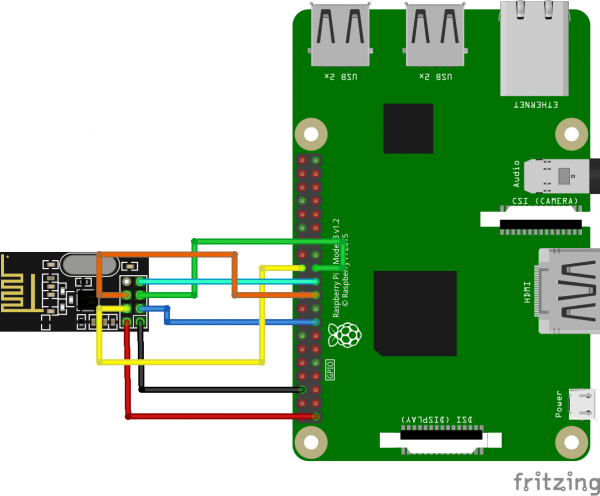
sudo apt-get update
sudo apt-get upgrade
wget http://tmrh20.github.io/RF24Installer/RPi/install.sh
chmod +x install.sh
./install.sh
cd rf24libs/RF24
sudo apt-get install python-dev libboost-python-dev
sudo apt-get install python-setuptools

sudo apt-get install librrd-dev // !!!!
RRDTOOL
rrdtool create waermepumpe_temps.rrd --step 60 \
DS:t01:GAUGE:150:0:100 \
DS:t02:GAUGE:150:0:100 \
DS:t03:GAUGE:150:0:100 \
DS:t04:GAUGE:150:0:100 \
DS:t05:GAUGE:150:0:100 \
DS:t06:GAUGE:150:0:100 \
RRA:AVERAGE:0.5:1:14400 \
RRA:AVERAGE:0.5:1440:3600 \
RRA:MAX:0.5:1440:3600 \
RRA:MIN:0.5:1440:3600
/*
 Copyright (C) 2017 Christian Bauer <oe3cjb@qth.at>

 This program is free software; you can redistribute it and/or
 modify it under the terms of the GNU General Public License
 version 2 as published by the Free Software Foundation.

 */

#include <rrd.h>
#include <cstdlib>
#include <iostream>
#include <sstream>
#include <string>
#include <unistd.h>
#include <RF24/RF24.h>

using namespace std;

RF24 radio(22,0);

bool radioNumber = 1;

/********************************/

// Radio pipe addresses for the 2 nodes to communicate.
const uint8_t pipes[][6] = {"Waerm","reuaB"};


int main(int argc, char** argv){

  typedef struct {
    long t01;
    long t02;
    long t03;
    long t04;
    long t05;
    long t06;
  } sensoren;

  sensoren wp;

  int rrd_argc = 3;
  char* rrd_argv[]={"update","/home/pi/waermepumpe_temps.rrd",NULL,NULL};

  cout << "Starte Wärmepumpen-Temperatur-Logger!" << endl;

  // Setup and configure rf radio
  radio.begin();
  radio.setDataRate(RF24_250KBPS);

  // optionally, increase the delay between retries & # of retries
  radio.setRetries(15,15);

  radio.openWritingPipe(pipes[1]);
  radio.openReadingPipe(1,pipes[0]);
  radio.startListening();

  // forever loop
  while (1)
  {
    // if there is data ready
    if ( radio.available() )
    {
      // Dump the payloads until we've gotten everything
      stringstream workhorse;
      string rrd_update_string;

      // laenge = radio.getDynamicPayloadSize();
      // Fetch the payload, and see if this was the last one.
      while(radio.available()){
    //    radio.read( &got_time, sizeof(unsigned long) );
    radio.read( &wp, sizeof(wp) );
      }
      // Ausgeben, was empfangen wurde
      //cout << "rrdtool update ~/waermepumpe_temps.rrd N:" << ((float) wp.t01)/100 << ":" << ((float) wp.t02)/100 << ":" << ((float) wp.t03)/100 << ":" << ((float) wp.t04)/100 << ":" << ((float) wp.t05)/100 << ":" << ((float) wp.t06)/100 << endl;
      workhorse << "N:" << ((float) wp.t01)/100 << ":" << ((float) wp.t02)/100 << ":" << ((float) wp.t03)/100 << ":" << ((float) wp.t04)/100 << ":" << ((float) wp.t05)/100 << ":" << ((float) wp.t06)/100;
      //rrd_update_string << "N:" << ((float) wp.t01)/100 << ":" << ((float) wp.t02)/100 << ":" << ((float) wp.t03)/100 << ":" << ((float) wp.t04)/100 << ":" << ((float) wp.t05)/100 << ":" << ((float) wp.t06)/100;
      rrd_update_string = workhorse.str();
      const char* cstr1 = rrd_update_string.c_str();
      cout << rrd_update_string << endl;
      rrd_argv[2] = (char *) cstr1;
      rrd_clear_error();
      rrd_update(rrd_argc,rrd_argv);
   }

      delay(5000); //Delay after payload responded to, minimize RPi CPU time

  } // forever loop
return 0;
}
rrdtool graph bild.png \
#!/bin/sh
rrdtool graph waermepumpe.png --width 640 --height 480 \
DEF:temp01=waermepumpe_temps.rrd:t01:AVERAGE \
DEF:temp02=waermepumpe_temps.rrd:t02:AVERAGE \
DEF:temp03=waermepumpe_temps.rrd:t03:AVERAGE \
DEF:temp04=waermepumpe_temps.rrd:t04:AVERAGE \
DEF:temp05=waermepumpe_temps.rrd:t05:AVERAGE \
DEF:temp06=waermepumpe_temps.rrd:t06:AVERAGE \
LINE2:temp01#00FF00:Zimmer \
LINE2:temp02#FFB400:Heizung-IN \
LINE2:temp03#FF0000:Heizung-OUT \
LINE2:temp05#0000FF:Quelle-IN \
LINE2:temp04#00FFFF:Quelle-OUT \
LINE2:temp06#990099:Wasserspeicher

USERNAME="wetterkamera"
PASSWORD="Kj69Ap"
SERVER="192.168.29.164"

# local directory to pickup *.tar.gz file
FILE="/home/pi"

# remote server directory to upload backup
BACKUPDIR="/"

# login to remote server
ftp -n -i $SERVER <